

This is the ninth post in our Cold Email Myths series, where we take the things everyone repeats about cold email and check them against how inboxes actually work.
Most people think of “the inbox” as one thing. You send a campaign, you get a deliverability score, and that score applies to everyone on your list.
In reality, your list is split between different gatekeepers, and the two biggest in B2B, Google and Microsoft, judge cold email differently. Your email can land in the inbox at Gmail and in Junk at Outlook on the same day. Understanding Gmail vs Outlook deliverability is how you find problems an average hides.
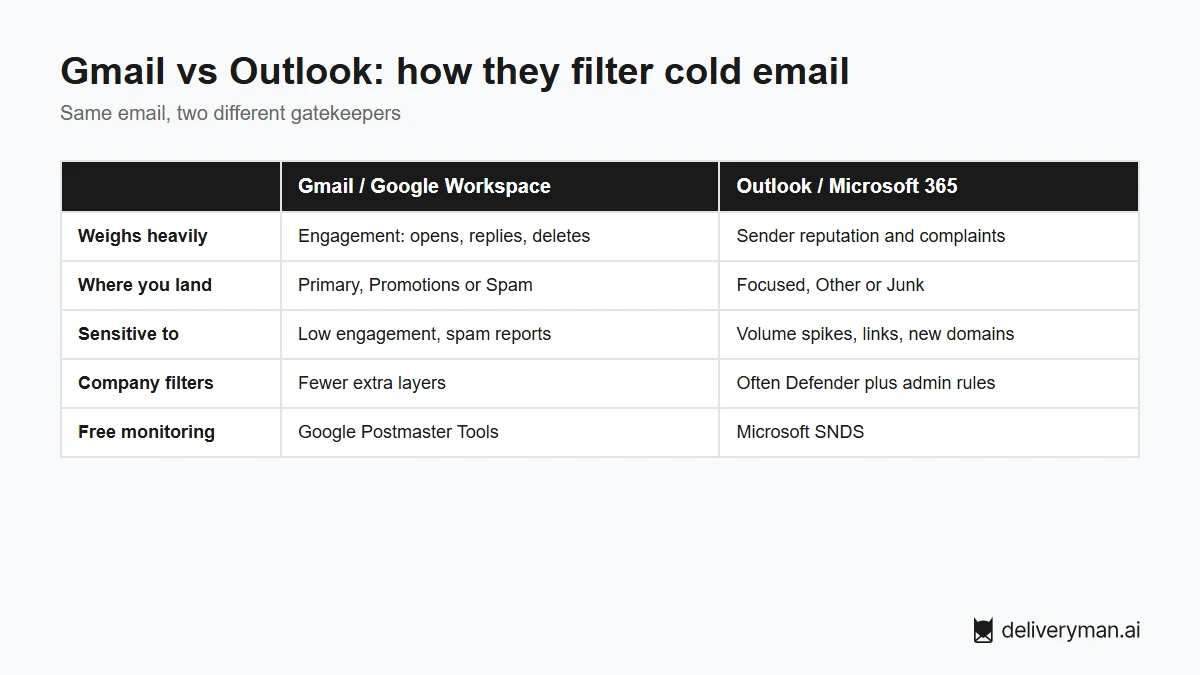
Gmail vs Outlook: how they filter cold email
How Gmail decides
- Engagement matters a lot. Gmail watches how people react to your email: opens, replies, deletes without reading, and especially spam reports.
- Tabs, not just spam. Even if you avoid spam, you can land in Promotions instead of Primary. Plain, personal emails tend to land in Primary.
- Strict sender rules. Google requires proper authentication and expects low spam complaint rates, and enforces stricter rules on bulk senders.
- Free monitoring: Google Postmaster Tools shows domain reputation and spam rate once you send enough volume.
How Outlook decides
- Reputation and history matter a lot. Microsoft leans heavily on your sending reputation and complaint history.
- Sensitive to sudden changes. New domains, volume spikes and link-heavy emails are more likely to land in Junk.
- Extra company layers. Microsoft 365 customers often run Defender and custom admin rules on top of Microsoft’s own filtering, so the same email can behave differently from company to company.
- Focused vs Other. Outside of Junk, emails can still land in the less-visible Other tab.
- Free monitoring: Microsoft SNDS shows data about your sending IPs.
Why one deliverability average can mislead you
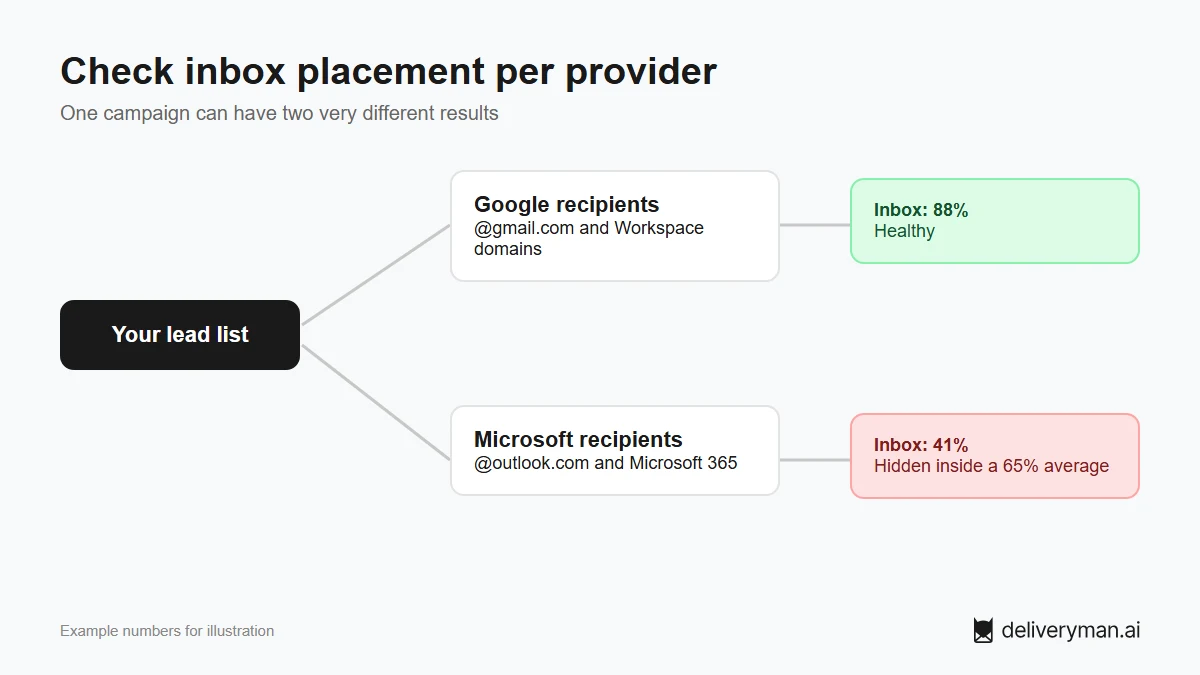
Say half your list uses Google and half uses Microsoft. You land in the inbox for 88% of Google recipients and 41% of Microsoft recipients. Your overall number is about 65%. That looks like “okay, could be better.” The real story is that more than half of your Microsoft prospects never see your email.
The same goes for reply rates. If a campaign does well with startups (mostly Google Workspace) and badly with enterprises (mostly Microsoft 365), the problem may not be your copy at all.
How to improve deliverability at both providers
- Know your list’s split. Check which leads are on Google and which are on Microsoft by looking at their domain’s MX records. Many verification tools show this.
- Test placement per provider. Send seed tests to both Gmail and Outlook inboxes, and look at the results separately, not as one number.
- Authenticate everything. SPF, DKIM and DMARC on every sending domain. Both providers expect it.
- Ramp slowly. Outlook in particular punishes sudden volume jumps from new domains. Warm up and grow volume gradually.
- Keep emails plain. Few or no links, no images, no heavy formatting. This helps with Gmail tabs and Microsoft’s filters alike.
- Earn replies. Relevant, short emails get replies, which is the strongest positive signal at both providers.
- Compare results by provider. If replies from one provider’s recipients drop, check placement there first.
FAQ
Is it harder to reach Outlook inboxes than Gmail?
Often, for cold email. Microsoft is sensitive to new domains and volume spikes, and many Microsoft 365 companies add their own filtering. That’s why testing Outlook separately matters.
Why does my cold email go to spam in Outlook but not Gmail?
The two providers weigh signals differently. Common causes at Outlook are a new or fast-ramping domain, links or tracking in the email, and extra company-level filters.
How do I know if a lead uses Gmail or Outlook?
Look up the MX records of their email domain. Google Workspace and Microsoft 365 each use recognizable mail servers. Many email verification tools show the provider for you.
How do I avoid the Promotions tab in Gmail?
Write like a person, not a newsletter: plain text, few links, no images, and a personal first line. The more your email looks like one-to-one email, the more likely it lands in Primary.
Land in the inbox at Gmail and Outlook. You bring a domain, and Deliveryman sets up 15 warmed-up mailboxes with SPF, DKIM and DMARC, verifies your list and spreads your sending so no mailbox carries too much. See pricing.