



This is the second post in our Cold Email Myths series, where we take the things everyone repeats about cold email and check them against real campaign numbers.
When teams try to scale cold email, the first move is almost always the same: send more. Cold email looks like simple math.
If 1,000 emails get 30 replies, then 10,000 emails should get 300. Want more meetings? Send more emails. Every sales team has heard some version of “it’s a numbers game.”
Here’s the short answer: more emails only means more replies if you add more domains to send them from. Push more volume through the same inbox and your reply rate drops, often below where it started. Spread the same volume across more domains and mailboxes, and replies grow with it.
Why people believe more emails means more replies
The myth makes sense at first, and early results seem to prove it:
- A team sends 50 emails a day from a warmed-up inbox and gets a few replies.
- They want more, so they push the same inbox to 300, then 500 a day.
- The first week looks great. Replies go up.
- A few weeks later, replies drop below where they started. Nothing in the dashboard shows an error, so they blame the list, the copy or the season.
The emails didn’t bounce. They were “delivered.” They were just delivered to spam.
That’s the catch with “delivered”: it only means the receiving server accepted the email, not that it reached the inbox. Your sending tool can’t see whether an email landed in the inbox or the spam folder, so a low bounce rate can hide a serious problem. We explain the difference, and 5 ways to check where your emails really land, in Cold Email Myth #3: “If It Didn’t Bounce, It Landed”.
What happens when you send more cold emails from one inbox
Gmail, Outlook and Yahoo don’t judge each email on its own. They judge the sender. Every email you send adds to a reputation score for your domain and your mailbox, and that score decides where your next email goes.
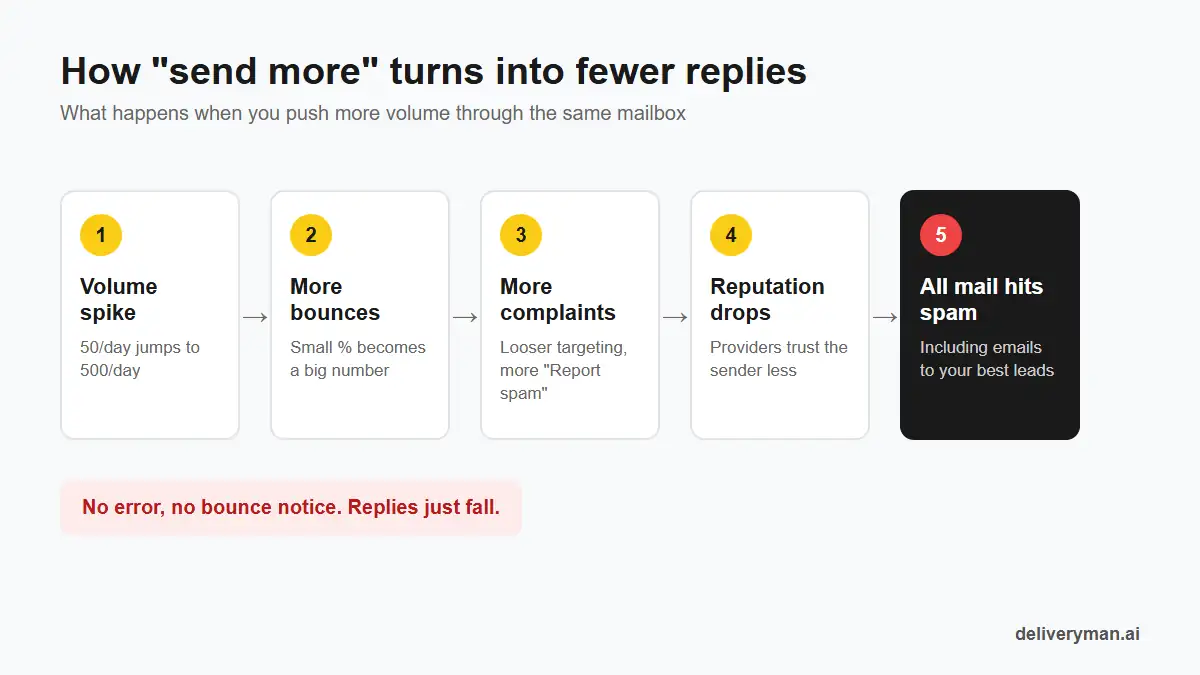
Pushing volume through one mailbox hurts that score in a few ways at once:
- Sudden spikes look like spam. Real people don’t go from 50 emails a day to 500. Spammers and hacked accounts do.
- More emails means more bounces. Even a good list has some bad addresses. At high volume, a small bounce rate becomes a large number of bounces.
- More emails means more spam complaints. Google and Yahoo want bulk senders to keep complaint rates under 0.3%, and ideally under 0.1%. Every extra send to a less relevant lead raises the chance someone clicks “Report spam.”
- Lower engagement drags the score down. When volume goes up, targeting usually gets looser. Fewer people open, reply or move your email out of spam, and providers notice.
Once your reputation drops, it doesn’t only affect the extra emails. It affects all of them, including the ones going to your best leads.
How to scale cold email: add more domains
This is the part the myth gets backwards. You can send more cold email. You just can’t send it all from the same place.
Every sending domain has a safe daily limit. Stay under it and the domain keeps landing in the inbox. Go over it and the whole domain starts to slide. So the way to grow volume is simple: keep each domain at its safe limit, and add domains when you need more reach.
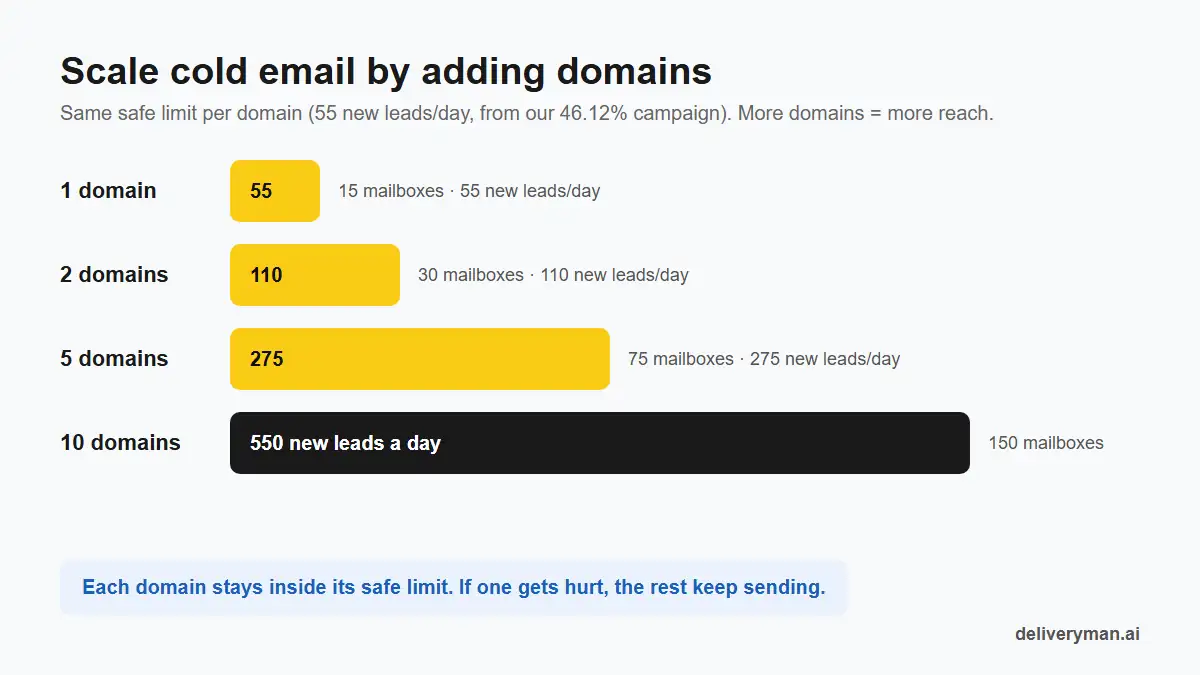
Using the 55 new leads a day per domain from our 46.12% campaign as the limit:
| Domains | Mailboxes | New leads a day | New leads a month (22 workdays) |
|---|---|---|---|
| 1 | 15 | 55 | 1,210 |
| 2 | 30 | 110 | 2,420 |
| 5 | 75 | 275 | 6,050 |
| 10 | 150 | 550 | 12,100 |
Adding domains does three things that pushing volume can’t:
- Volume grows, but per-domain volume doesn’t. Each domain still looks like a normal, healthy sender.
- Risk is split. If one domain gets a spam complaint spike, the others keep sending. With one domain, one bad week stops everything.
- Your main domain stays safe. Cold email goes out from separate sending domains, so your company’s everyday email is never at risk.
How many domains do you need?
Take the number of new leads you want to contact each day and divide it by your safe limit per domain. At 55 a day per domain:
- 100 new leads a day → 2 domains
- 250 new leads a day → 5 domains
- 500 new leads a day → 10 domains
Then add one or two spare domains warming up in the background, so you can rotate in fresh ones if any domain needs a rest.
More mailboxes on each domain, not more emails per mailbox
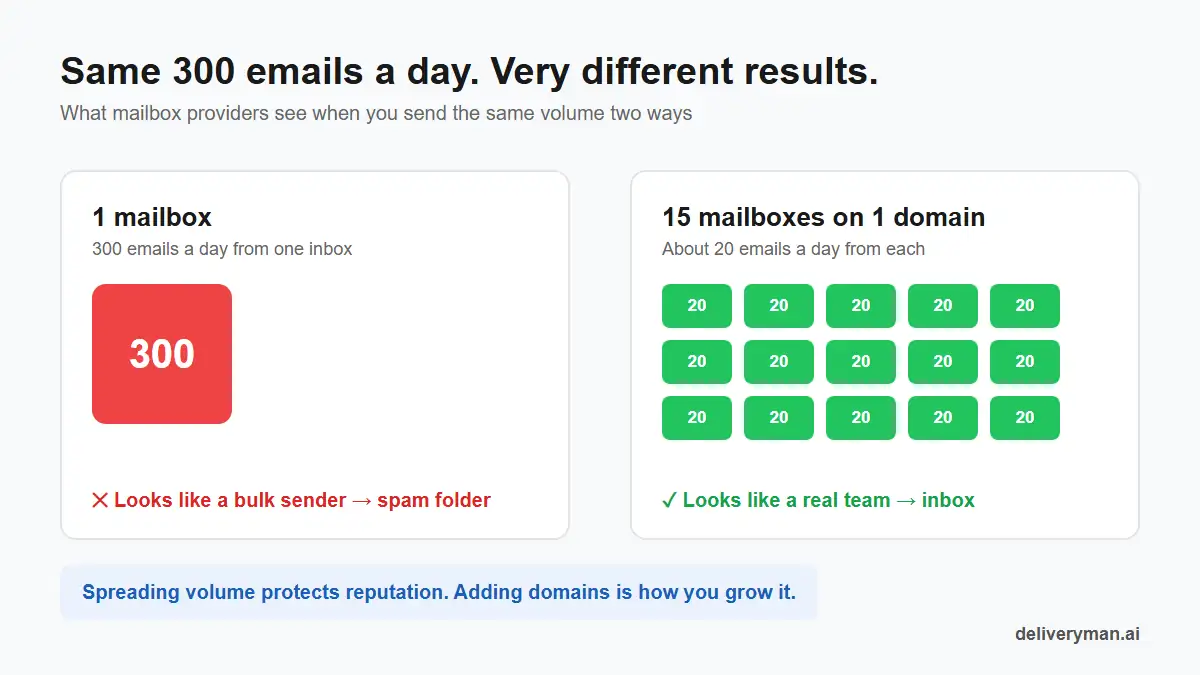
Inside each domain, the same rule applies one level down. One mailbox sending 300 emails a day looks like a bulk sender. Fifteen mailboxes sending about 20 each look like a team of people doing their jobs.
| Scaling the wrong way | Scaling the right way |
|---|---|
| Hundreds of emails a day from one mailbox | About 20 a day from each of many mailboxes |
| Adding more leads to the same domain | Adding more domains |
| Doubling volume overnight | Raising volume slowly, after warm-up |
| Loosening targeting to fill the quota | Keeping the list tight and verified |
| Measuring emails sent | Measuring replies |
The proof: low volume per domain, high reply rates
Two real campaigns run on Deliveryman are a good test of this myth, because neither one pushed volume per domain.
About 20 to 25 emails a day: 22.66% reply rate
One campaign ran on a single domain and sent about 20 to 25 emails a day. It contacted 409 local business owners and got 92 replies, a 22.66% reply rate, with 0 unsubscribes. Read the full 22.66% reply rate case study.
At a typical 3% reply rate, getting the same 92 replies would take over 3,000 emails. This campaign got them with about one-eighth of that.
Two domains at 55 new leads a day each: 46.12% reply rate
The other campaign capped new leads at 55 per domain a day across two domains. It contacted 1,226 independent publishers and got 564 replies, a 46.12% reply rate, with a 0.73% bounce rate. Read the full 46% reply rate case study.
When the team wanted to reach more people, they didn’t raise the cap. They added a second domain. Total volume doubled, per-domain volume stayed the same, and the reply rate held.
Neither campaign won by pushing more through one inbox. Both won because almost every email they sent landed in the inbox.
How to scale cold email without killing your replies
1. Add domains, not volume
Set a safe daily limit per domain and never go over it. When you need more reach, add another warmed-up domain. This is the single biggest lever for sending more emails safely.
2. Spread each domain across many mailboxes
Keep each mailbox to a small daily volume, around 20 emails. More mailboxes per domain means more total sends without any single inbox standing out.
3. Warm up new domains before you need them
A new domain needs to be warmed up before its first cold email. Start warming the next domain before you hit your limit, so extra capacity is ready when you need it.
4. Grow the list without loosening it
More volume should mean more of the right people, not a wider net. Verify every address and keep bounces under 2%. A smaller list of good fits will out-reply a big list of maybes.
5. Watch the warning signs
If replies drop while volume goes up, stop adding volume. Check bounce rate, spam complaints and inbox placement before you touch the copy. A falling reply rate is often a deliverability problem that looks like a copy problem.
Quick checklist before you scale
- Need more reach? Add a domain, don’t push the ones you have.
- Keep a safe daily limit per domain and per mailbox.
- Spread every domain across several mailboxes.
- Keep a spare domain warming up in the background.
- Never send cold email from your main company domain.
- Verify the list and keep bounces under 2%.
- Keep spam complaints under 0.3%.
- Judge the campaign by replies, not by emails sent.
FAQ
What is the best way to scale cold email?
Add sending domains instead of pushing more volume through the ones you have. Keep each domain under a safe daily limit, spread it across several mailboxes, and warm up new domains before you need them. Volume grows while every domain stays a healthy sender.
Does sending more cold emails get more replies?
Only if the extra emails come from extra domains and mailboxes. Sending more from the same inbox hurts your sender reputation, pushes emails into spam and usually lowers total replies.
How many cold emails can I send per day per mailbox?
Keep each warmed-up mailbox to a small daily volume, around 20 cold emails. To send more in total, add mailboxes and domains instead of raising the per-mailbox number.
How many domains do I need for cold email?
Divide the number of new leads you want to reach each day by your safe limit per domain. At 55 new leads a day per domain, 250 leads a day needs about 5 domains. Keep one or two extra domains warming up as backups.
Why did my reply rate drop when I increased volume?
Most likely your emails started landing in spam. A sudden jump in volume, more bounces and more spam complaints all lower sender reputation. Lower your volume per domain, check deliverability and add domains to make up the difference.
Next in the series: Cold Email Myth #3: “If It Didn’t Bounce, It Landed” (Inbox Placement Explained). Why a low bounce rate doesn’t mean your emails reach the inbox, and how to test your inbox placement.
Want to send more without the risk? You bring the domains. Deliveryman turns each one into 15 warmed-up mailboxes, sets up your DNS, verifies your list and spreads your sending so no mailbox carries too much. Need more reach? Add another domain. See pricing.